Skip to Main Content Skip to Navigation

Loading
Loading...

Loading
Loading...

Felician University Logo Image. Felician University Logo Image.
  • Home
  • Groups
  • Events
  • News
    • Home
    • Groups
    • Events
    • News
  • Sign In
Top of Main Content

Subscribe to Calendars

ICS Feeds Outlook 2010 Apple iCal Outlook 365 Web Google Calendar iPhone/iPad Learn More
Export the campusgroups.com calendars to a number of "ICS" supported calendars including Google Calendar, Outlook, iCal, etc. The calendar feeds are updated every time an event is added or updated.
Your Personal Feed of Events
Please sign in to see your Favorite Events ICS feed.

School-wide Calendar
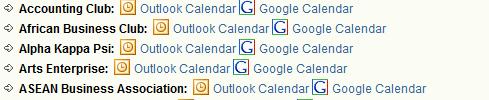
The Felician University Calendar of Events (all public events from all groups) Outlook Icon Outlook Google Icon Google Apple ICAL Icon iCal Copy Link Icon Copy Link

Group Calendars
  • Starring a group calendar will add all its events to your Personal Feed (see above).
  • If you are a member of the group, the feed will contain public AND members-only events.
  • If you are an officer of the group, the feed will contain ALL upcoming events listed in your manage section.
Active Minds
Student Organization
Outlook Icon Outlook Google Icon Google Apple ICAL Icon iCal Copy Link Icon Copy Link
Alumni Engagement
Department
Outlook Icon Outlook Google Icon Google Apple ICAL Icon iCal Copy Link Icon Copy Link
Artemisia Chapter of Mu Sigma Upsilon Sorority Inc.
Student Organization
Outlook Icon Outlook Google Icon Google Apple ICAL Icon iCal Copy Link Icon Copy Link
Athletics
Department
Outlook Icon Outlook Google Icon Google Apple ICAL Icon iCal Copy Link Icon Copy Link
Black Student Union
Student Organization
Outlook Icon Outlook Google Icon Google Apple ICAL Icon iCal Copy Link Icon Copy Link
Campus Activities Board
Student Organization
Outlook Icon Outlook Google Icon Google Apple ICAL Icon iCal Copy Link Icon Copy Link
Campus Ministry
Department
Outlook Icon Outlook Google Icon Google Apple ICAL Icon iCal Copy Link Icon Copy Link
Career & Experiential Learning Center
Department
Outlook Icon Outlook Google Icon Google Apple ICAL Icon iCal Copy Link Icon Copy Link
Caribbean Student Association
Student Organization
Outlook Icon Outlook Google Icon Google Apple ICAL Icon iCal Copy Link Icon Copy Link
Center For Student Development & Engagement
Department
Outlook Icon Outlook Google Icon Google Apple ICAL Icon iCal Copy Link Icon Copy Link
Chabad on Campus
Department
Outlook Icon Outlook Google Icon Google Apple ICAL Icon iCal Copy Link Icon Copy Link
Commencement
Department
Outlook Icon Outlook Google Icon Google Apple ICAL Icon iCal Copy Link Icon Copy Link
Commuter Student Organization
Student Organization
Outlook Icon Outlook Google Icon Google Apple ICAL Icon iCal Copy Link Icon Copy Link
Corporate Relations
Department
Outlook Icon Outlook Google Icon Google Apple ICAL Icon iCal Copy Link Icon Copy Link
Counseling and Wellness Services
Department
Outlook Icon Outlook Google Icon Google Apple ICAL Icon iCal Copy Link Icon Copy Link
Dining Services
Department
Outlook Icon Outlook Google Icon Google Apple ICAL Icon iCal Copy Link Icon Copy Link
FALCON Commons
Department
Outlook Icon Outlook Google Icon Google Apple ICAL Icon iCal Copy Link Icon Copy Link
Falcons Vocal Choir
Student Organization
Outlook Icon Outlook Google Icon Google Apple ICAL Icon iCal Copy Link Icon Copy Link
Felician University Residence Hall Association
Student Organization
Outlook Icon Outlook Google Icon Google Apple ICAL Icon iCal Copy Link Icon Copy Link
Felician University Student Government Association
Student Organization
Outlook Icon Outlook Google Icon Google Apple ICAL Icon iCal Copy Link Icon Copy Link
First Year Experience
Department
Outlook Icon Outlook Google Icon Google Apple ICAL Icon iCal Copy Link Icon Copy Link
Gaming Club
Student Organization
Outlook Icon Outlook Google Icon Google Apple ICAL Icon iCal Copy Link Icon Copy Link
Home Page
Department
Outlook Icon Outlook Google Icon Google Apple ICAL Icon iCal Copy Link Icon Copy Link
Incoming First Year Students
Department
Outlook Icon Outlook Google Icon Google Apple ICAL Icon iCal Copy Link Icon Copy Link
Information Technology
Department
Outlook Icon Outlook Google Icon Google Apple ICAL Icon iCal Copy Link Icon Copy Link
International Students Association
Student Organization
Outlook Icon Outlook Google Icon Google Apple ICAL Icon iCal Copy Link Icon Copy Link
Italian Club
Student Organization
Outlook Icon Outlook Google Icon Google Apple ICAL Icon iCal Copy Link Icon Copy Link
JEDI
Department
Outlook Icon Outlook Google Icon Google Apple ICAL Icon iCal Copy Link Icon Copy Link
Library Services
Department
Outlook Icon Outlook Google Icon Google Apple ICAL Icon iCal Copy Link Icon Copy Link
Mission Integration
Department
Outlook Icon Outlook Google Icon Google Apple ICAL Icon iCal Copy Link Icon Copy Link
National Society of Leadership and Success at Felician University
Student Organization
Outlook Icon Outlook Google Icon Google Apple ICAL Icon iCal Copy Link Icon Copy Link
Nursing Resource Simulation Center
Department
Outlook Icon Outlook Google Icon Google Apple ICAL Icon iCal Copy Link Icon Copy Link
Office of International Programs
Department
Outlook Icon Outlook Google Icon Google Apple ICAL Icon iCal Copy Link Icon Copy Link
Office of the President
Department
Outlook Icon Outlook Google Icon Google Apple ICAL Icon iCal Copy Link Icon Copy Link
Omega Phi Chi Multicultural Sorority Inc. at Felician University
Student Organization
Outlook Icon Outlook Google Icon Google Apple ICAL Icon iCal Copy Link Icon Copy Link
Performing Arts Club
Student Organization
Outlook Icon Outlook Google Icon Google Apple ICAL Icon iCal Copy Link Icon Copy Link
Physical Therapy Club
Student Organization
Outlook Icon Outlook Google Icon Google Apple ICAL Icon iCal Copy Link Icon Copy Link
Pre-Med Society
Student Organization
Outlook Icon Outlook Google Icon Google Apple ICAL Icon iCal Copy Link Icon Copy Link
Prospanica Felician University Chapter
Student Organization
Outlook Icon Outlook Google Icon Google Apple ICAL Icon iCal Copy Link Icon Copy Link
Psychology Club
Student Organization
Outlook Icon Outlook Google Icon Google Apple ICAL Icon iCal Copy Link Icon Copy Link
Relay For Life
Student Organization
Outlook Icon Outlook Google Icon Google Apple ICAL Icon iCal Copy Link Icon Copy Link
Residence Life
Department
Outlook Icon Outlook Google Icon Google Apple ICAL Icon iCal Copy Link Icon Copy Link
RX Society
Student Organization
Outlook Icon Outlook Google Icon Google Apple ICAL Icon iCal Copy Link Icon Copy Link
School of Arts and Sciences
Department
Outlook Icon Outlook Google Icon Google Apple ICAL Icon iCal Copy Link Icon Copy Link
School of Business & Information Sciences
Department
Outlook Icon Outlook Google Icon Google Apple ICAL Icon iCal Copy Link Icon Copy Link
School of Education
Department
Outlook Icon Outlook Google Icon Google Apple ICAL Icon iCal Copy Link Icon Copy Link
School of Nursing
Department
Outlook Icon Outlook Google Icon Google Apple ICAL Icon iCal Copy Link Icon Copy Link
Sports Management/Analytics Club
Student Organization
Outlook Icon Outlook Google Icon Google Apple ICAL Icon iCal Copy Link Icon Copy Link
STEAM Club
Student Organization
Outlook Icon Outlook Google Icon Google Apple ICAL Icon iCal Copy Link Icon Copy Link
STEM for Life
Student Organization
Outlook Icon Outlook Google Icon Google Apple ICAL Icon iCal Copy Link Icon Copy Link
Student Alumni Association
Student Organization
Outlook Icon Outlook Google Icon Google Apple ICAL Icon iCal Copy Link Icon Copy Link
Student Nurses Association
Student Organization
Outlook Icon Outlook Google Icon Google Apple ICAL Icon iCal Copy Link Icon Copy Link
Study Abroad
Department
Outlook Icon Outlook Google Icon Google Apple ICAL Icon iCal Copy Link Icon Copy Link
Test Group - Engagement Staff
Student Organization
Outlook Icon Outlook Google Icon Google Apple ICAL Icon iCal Copy Link Icon Copy Link
Transfer Student Organization
Student Organization
Outlook Icon Outlook Google Icon Google Apple ICAL Icon iCal Copy Link Icon Copy Link
Violence Against Womens Act
Department
Outlook Icon Outlook Google Icon Google Apple ICAL Icon iCal Copy Link Icon Copy Link
Wings of Pride (LGBTQ+)
Student Organization
Outlook Icon Outlook Google Icon Google Apple ICAL Icon iCal Copy Link Icon Copy Link
Event calendar with a star
Benefits of Subscribing to Calendars
  • View your events in your personal calendar (i.e. Outlook, Google Calendar, iCal, iPhone Agenda, Android, etc).
  • When a group modifies an event, it is automatically updated in your personal calendar.
  • Receive event reminders (right now, this can only be achieved by subscribing from your iPhone/iPad).


Why should you star events in CampusGroups/Ready Campus?
  • Save time - When you star an event, it is automatically added to your personal calendar in 1 click.
  • Customize your list of events - As opposed to the Group Calendar Feeds, your Favorite Events feed allows you to select the events you are interested in, and to only have these events added to your calendar.
  • Know when changes happen - We notify you when an event you starred was modified or cancelled.

There are 2 types of ICS feeds in the platform:
(1) Group calendar feeds: containing all public events of a group (go to the Calendar and click on Subscribe to Calendars to access these feeds)
(2) Your personal feed of events: containing all events that you "Starred" + All the events of the group calendars you starred


We recommend that you subscribe to your ICS feeds from your Outlook Desktop. Any change made to an event will be automatically and instantaneously updated on your calendar.

Limitation:
You will not receive any event reminders unless you manually copy your events from your ICS subscription into your personal calendar.

Solution:
* If you have an iPhone/iPad, also subscribe to your ICS from your Mobile
* If you have a Android, connect CampusGroups/Ready Campus to your Google Account and your events will automatically appear in your Google Calendar on the Web and on your phone

How to subscribe to an ICS feed into your Outlook Calendar

1) Click on the Copy Link link and copy the ICS URL.

2) In Outlook, on the Tools menu, click Account Settings.

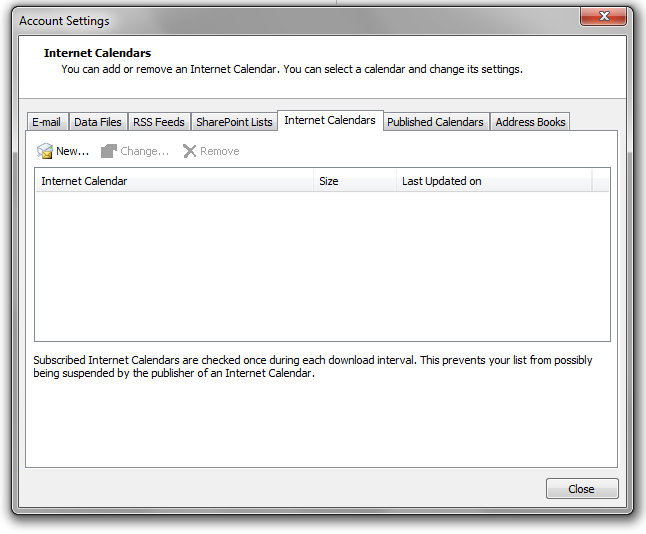
3) On the Internet Calendars tab, click New.

Windows Account settings, Internet Calendars Dialog Image
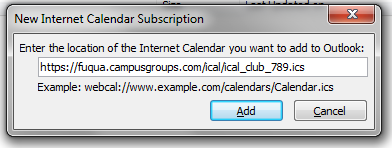
4) Paste the URL you copied in step 3. Click Add.

Windows New Internet Calendar Subscription Popup Image

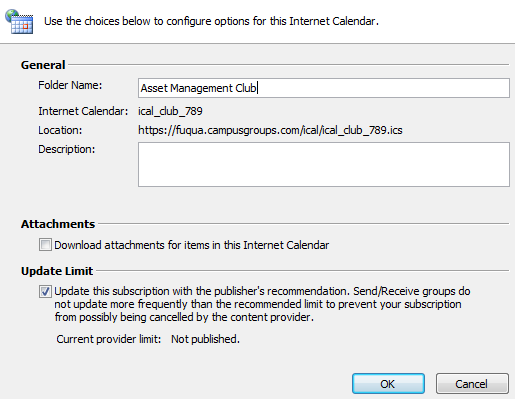
5) In the Folder Name box, type the name of the calendar as you want it to appear in Outlook, and then click OK.

Windows Internet Calendar Configuration Dialog Image

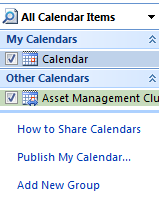
6) Click ok. You should see your new calendar on the left of your Outlook:

Windows All Calendar Items Top Left Snippet Screenshot

We recommend that you subscribe to your CampusGroups/Ready Campus ICS feeds from your Apple iCal app on your Mac. Any change made to an event will be automatically and instantaneously updated on your calendar.

Limitation:
You will not receive any event reminders unless you manually copy your events from your ICS subscription into your personal calendar.

Solution:
* If you have an iPhone/iPad, also subscribe to your ICS from your Mobile
* If you have a Android, connect CampusGroups to your Google Account and your events will automatically appear in your Google Calendar on the Web and on your phone

How to subscribe to an ICS feed from your iCal Calendar

1) Copy the iCalLink URL under the "ICS Feeds" tab of this popup.

2) In iCal, on the Files menu, click on New Calendar Subscription.

3) Paste the URL you copied in step 1. Click Subscribe.


Your ICS subscriptions will appear in your Outlook.com account and will also appear on your mobile as long as you have connected your Mobile with your Outlook account.

Limitation:
Your ICS subscription will only be updated every 3 hours and will not allow you to receive reminders.

How to subscribe to a ICS feed from Outlook Calendar:

1) Click on the Link link and copy the ICS URL for the calendar you wish to add.

2) Open a new tab in your browser and go to outlook.com for felu and sign in with your NetID and password.

3) Click on the Calendar link in the O365 Ribbon

Office 365 Calendar Screenshot 1

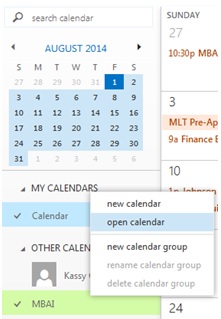
4) Right Click on My Calendars and select open calendar from the context menu
Office 365 Calendar Screenshot 2

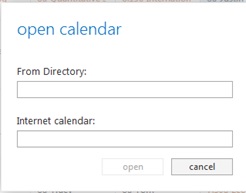
5) Paste the calendar URL into the Internet calendar: box and click the open button.
Office 365 Calendar Screenshot 3

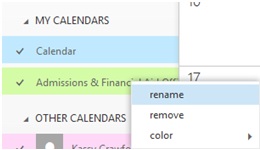
6) Back in the Calendar view, expand My Calendars. Right click the newly added calendar and choose Rename. Choose a name that reflects how you want to view the calendar. This change will be reflected on all your personal devices
Office 365 Calendar Screenshot 4

Your ICS subscriptions will appear in your Google Calendar account and will also appear on your mobile as long as you have connected your Mobile with your Google account.

Limitation:
Your ICS subscription will only be updated every 12 hours and will not allow you to receive reminders. This is a known issue which Google has not yet decided to resolve.


How to subscribe to an ICS feed from your Google Calendar:

I] First Method

1) Click on the Google Calendar link of the group which calendar you want to export.

Google Calendar Screenshot 1

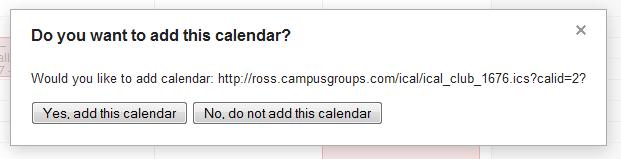
2) In the new tab, choose Yes, add this calendar

Google Calendar Screenshot 2

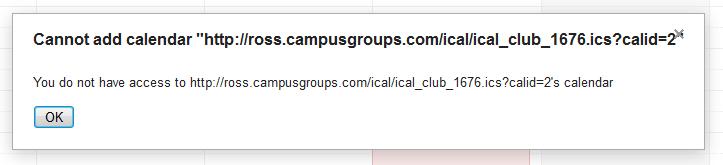
Your Google Calendar should now be updated. But sometimes, depending of the configuration, you are not allowed to add the calendar and you see this screen:

Google Calendar Screenshot 3

This is due to a conflict between Google Calendar and your browser. You can try to update your browser, or even better for this widget, use Google Chrome. Or follow the second method.

II] Second Method

1) Copy the link of the "Cannot add" message, then click OK.

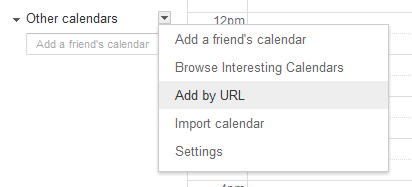
2) Go to Google Calendar. Click on the triangle next to Add in the "Other Calendars" section (bottom left of the screen) and select Add by URL.

Google Calendar Screenshot 4

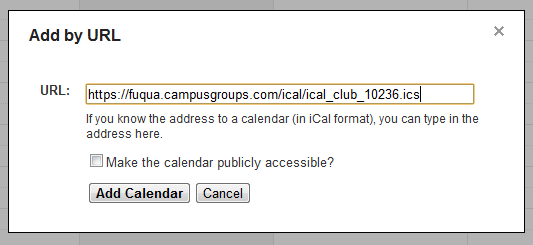
3) A window will pop up asking for the URL of the calendar. Paste the link you copied on step 2 and click on Add Calendar.

Google Calendar Screenshot 5

4) The events of the selected group will show up on your calendar and they will get updated just as they are on the platform.

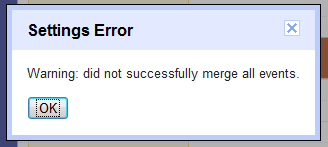
We have noticed that after Step #3 some Users may sometimes get the following Error Message

Google Calendar Screenshot 6
If this happens to you, just repeat instantly Steps 4 and 5 and you should be fine.

This is a great way to subscribe to any CampusGroups/Ready Campus ICS feeds from your iPhone/iPad, and to also get Reminders/Alerts 15mn before the event.

Once you have set up your calendar subscription:
1) Adding a "Star" to an event will automatically and instantaneously add this event into your mobile calendar and reminder.
2) Modifications to any of your events (i.e. date/time, location, etc), will be automatically replicated on your mobile calendar.
3) You will also be notified in the platform when changes to events occur.

How to synchronize CampusGroups/Ready Campus ICS feeds with an iOS device

1) Open the Settings application on your device's home screen

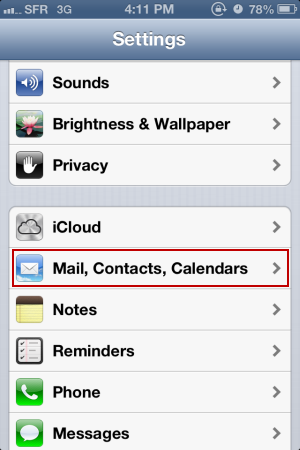
2) Open Mail, Contacts, Calendars

iPhone Calendar Setup Screenshot 1

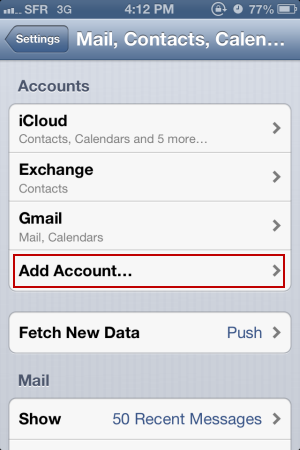
3) Select Add Acount...

iPhone Calendar Setup Screenshot 2

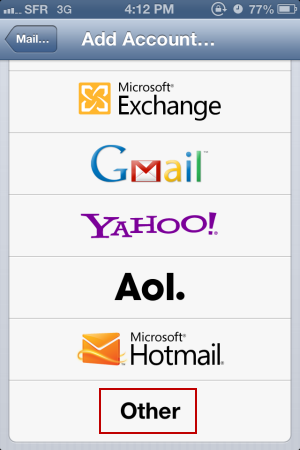
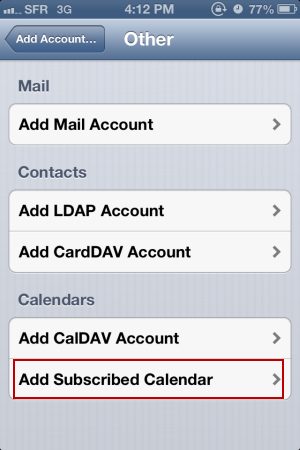
4) Select Other

iPhone Calendar Setup Screenshot 3

5) Select Add Subscribed Calendar

iPhone Calendar Setup Screenshot 4

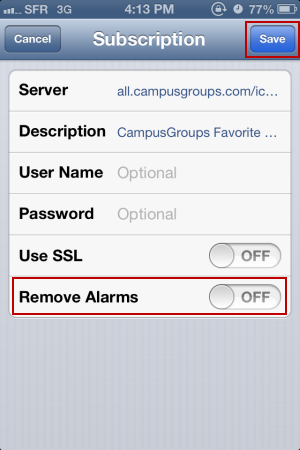
6) In the Server field, enter your ICS feed URL (.ics)

7) Leave the Remove Alarms to "Off" and click Save

iPhone Calendar Setup Screenshot 5

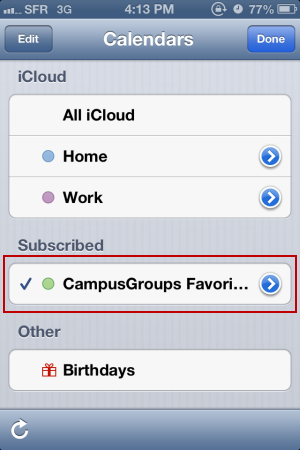
8) Open your Agenda App from the home screen of your device and click on Calendars. Make sure that you new ICS subscription is there and checked. You can select a color for your new subscription.

iPhone Calendar Setup Screenshot 6

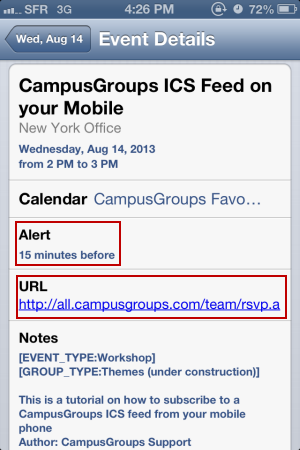
9) On your Agenda App, if you click on an event, you can see all Event Details

iPhone Calendar Setup Screenshot 7


You will receive a notification/alarm on your device 15 minutes before an event.
Felician University Website Logo

Contact


Felician University
One Felician Way
Rutherford, New Jersey 07070
United States

centerforengagement@felician.edu

Links


Groups
Events
News
Terms of Service
Privacy Policy
Support Center
©2025 CampusGroups